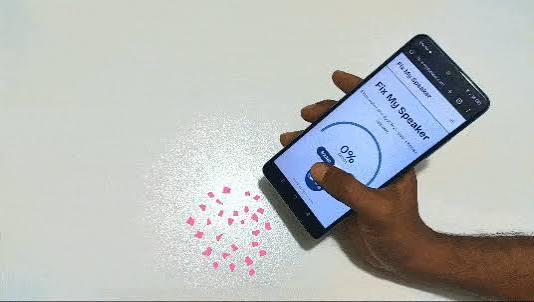

A phone speaker is an important part of your device. You use it for calls, music, videos, alarms, and voice messages every day. But sometimes the speaker suddenly becomes quiet, unclear, or muffled. This commonly happens when water, moisture, dust, or dirt enters the speaker area.
If you are searching for Fix my speaker, you probably want a simple way to improve your phone’s sound without immediately visiting a repair shop. In many cases, basic cleaning and water-removal methods can help restore clearer audio.
This guide explains common speaker problems, safe cleaning methods, and simple steps you can try at home.
Why Does My Phone Speaker Sound Muffled?
A muffled phone speaker does not always mean that the speaker is permanently damaged. Small speaker holes can easily collect dust and dirt over time.
Water is another common reason. If your phone gets wet in rain, near a sink, or from accidental splashes, small water droplets may remain around the speaker grille. These droplets can block sound and make audio quieter than normal.
Common reasons include:
- Water trapped around the speaker
- Dust inside the speaker grille
- Dirt or lint blocking speaker holes
- Low media volume
- Bluetooth connection issues
- Temporary software problems
- Physical speaker damage
Before assuming that your speaker needs professional repair, it is worth checking these simple problems.
How to Fix a Wet Phone Speaker
If your phone recently came into contact with water, start by disconnecting it from any charger or cable. Remove the case if it is holding moisture around the device.
Gently wipe the outside of your phone with a soft and dry cloth. Keep the speaker area facing downward when possible so that moisture can move away from the speaker opening.
Do not insert sharp objects into the speaker grille. Pins, needles, or other metal objects can damage the small components inside your phone.
After drying the outside, you can test the speaker by playing normal audio at a moderate volume.
Use Sound to Help Remove Water
One popular method for dealing with a wet speaker is playing a low-frequency sound designed to create speaker vibrations.
The basic idea is simple. Your phone’s speaker moves when it produces sound. Certain tones can create noticeable vibrations that may help move small water droplets away from the speaker opening.
A Fix my speaker sound tool can be useful when your speaker becomes muffled after minor water exposure. Play the cleaning sound while keeping the phone’s speaker facing downward.
You may need to repeat the process a few times.
However, sound-based cleaning should not be treated as a repair for serious water damage. If your phone was fully submerged or is showing other problems, professional inspection may be necessary.
How to Clean Dust From a Phone Speaker
Water is not the only problem. Dust can slowly build up around speaker holes, especially if you regularly keep your phone in a pocket or bag.
Start by switching off the phone. Check the speaker grille under good lighting.
Use a clean, soft, and dry brush to gently remove visible dust from the surface. Move the brush lightly instead of pushing dirt deeper into the speaker.
Avoid pouring water, cleaning liquid, or alcohol directly into the speaker holes unless the phone manufacturer specifically recommends a cleaning method for your model.
Once the surface is clean, turn the phone back on and test the sound.
Check Your Phone Volume Settings
Sometimes the speaker itself is completely fine.
Before trying complicated solutions, increase the media volume and play a video or song. Make sure the phone is not in a special audio mode that reduces sound.
Also check whether Bluetooth is enabled. Your phone may be sending audio to wireless earbuds, headphones, a car system, or another connected device.
Turn Bluetooth off temporarily and test the speaker again.
This simple check can save a lot of unnecessary troubleshooting.
Restart Your Phone
A temporary software issue can also affect audio.
Restarting the phone closes temporary processes and reloads the operating system. After restarting, play different types of audio.
For example, test:
- A music track
- A video
- Your ringtone
- Speakerphone during a call
If only one application has low or distorted sound, the problem may be related to that application rather than your phone’s physical speaker.
What Should You Avoid When Cleaning a Speaker?
Trying to Fix my speaker quickly can sometimes cause more damage if unsafe cleaning methods are used.
Never aggressively push a needle, pin, toothpick, or another sharp object into the speaker holes. You should also avoid using excessive heat.
A hair dryer may seem like a fast solution for moisture, but high heat can damage phone components, adhesives, seals, or the battery.
You should also avoid shaking or hitting the phone aggressively. Gentle cleaning and proper drying are safer options.
How Long Does a Wet Speaker Take to Dry?
There is no single drying time for every phone.
It depends on how much water entered the device, the speaker design, environmental conditions, and the phone model. A small splash around the speaker may clear relatively quickly, while more serious water exposure can require much more time.
Keep your phone in a dry and well-ventilated area.
If sound quality gradually improves, remaining moisture may simply be evaporating. If the speaker remains distorted or other parts of the phone stop working, professional assistance is a better option.
When Should You Visit a Repair Technician?
Home methods are mainly useful for minor problems involving surface moisture, dust, settings, or temporary software issues.
You should consider professional repair if:
- The speaker produces no sound at all
- Sound remains heavily distorted
- The phone was deeply submerged in water
- The device becomes unusually hot
- The phone does not turn on normally
- Microphone and speaker problems appear together
- The problem continues after cleaning and drying
A technician can determine whether the speaker module or another internal component needs repair.
Final Thoughts
A quiet or muffled phone speaker can be frustrating, but it does not always mean that your device is permanently damaged. Water droplets, dust, Bluetooth connections, volume settings, and temporary software problems can all affect sound quality.
Start with simple and safe troubleshooting. Dry the outside of the device, gently clean visible dust, check your audio settings, restart the phone, and test the speaker again. For minor moisture around the speaker grille, a Fix my speaker sound can also help create vibrations that may move trapped droplets.
If these methods do not improve the sound, avoid repeatedly experimenting with risky DIY techniques. A professional technician can inspect the phone and identify whether there is physical or internal water damage.